Map Objects & Custom Assets
Forerunner, 2024
Extending a property-first platform into an infrastructure and asset management system.
Role
Senior Product Designer
Team
Product Manager, Engineer, GIS Analysts (2)
Timline
2-week sprint, 3 months to launch
Forerunner is a platform that modernizes how local governments manage flood risk and resilience: making complex data and regulations easier to understand, share, and act on.
Overview
The Problem
Forerunner’s map previously treated properties as the only interactive object. Everything else—pipes, inlets, culverts—was imported through an external GIS workflow (Forest Admin) as static overlays. These layers were visible on the map but:
Not clickable
Not tied to any workflows
Not eligible for tasks or records
This created several issues:
Infrastructure systems were visible but not actionable
Users could only manage workflows at the parcel level
A major statewide contract requiring stormwater asset management was blocked
We needed to evolve Forerunner from a property-only viewer to a platform that understood infrastructure systems, without rebuilding the entire GIS import pipeline. This shift was foundational to supporting inspection, maintenance, and long-term asset management workflows later described as Asset & Infrastructure Management.
The Solution
We introduced Map Objects: a way to treat infrastructure assets as interactive, first-class objects alongside properties, enabling inspection, maintenance, and compliance workflows at the asset level.
With this release, users can:
Import stormwater and other asset layers as interactive objects
Click any asset to open an Object Information Panel
Attach records, inspections, and tasks to assets, mirroring property workflows
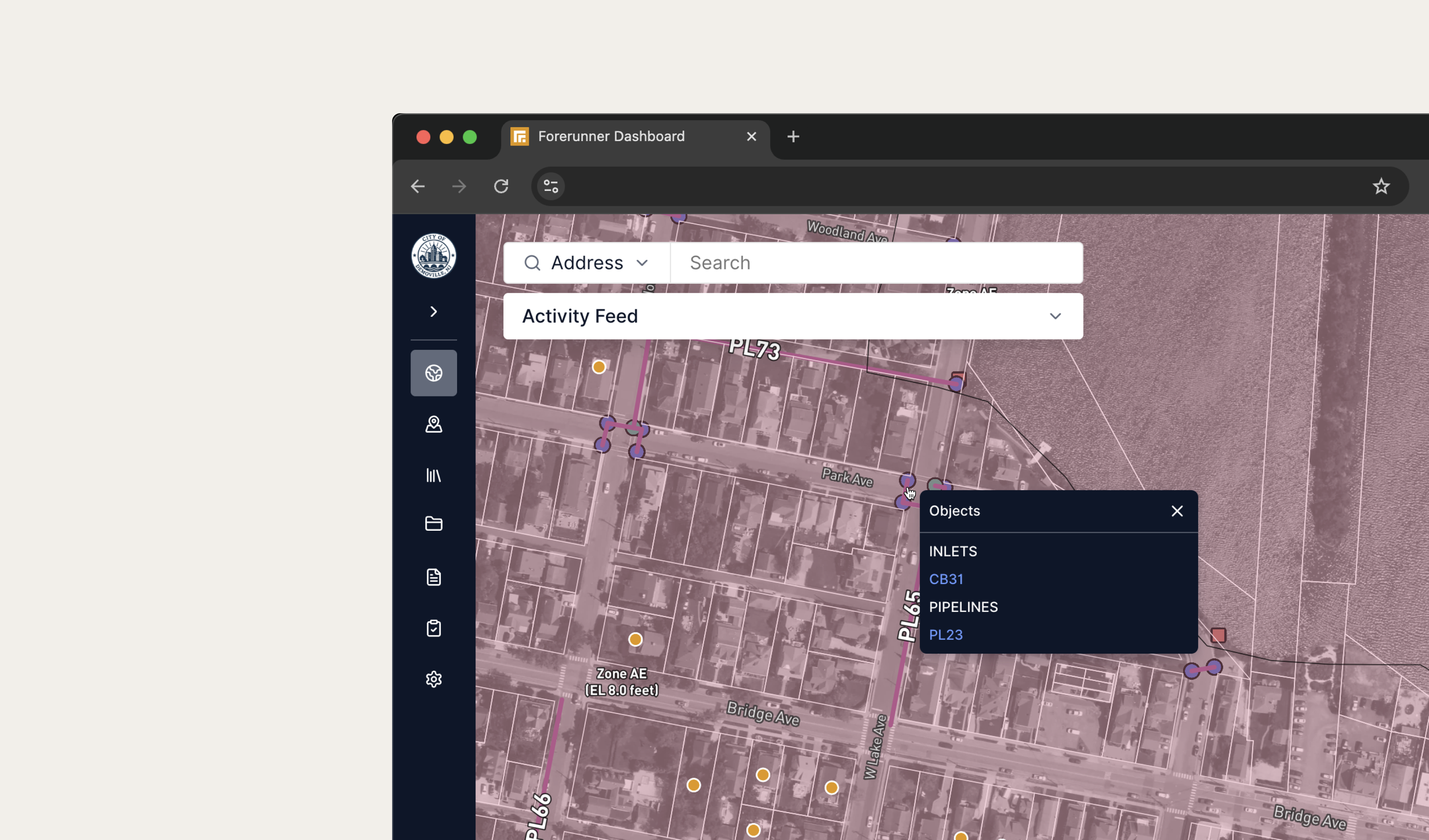
To keep dense systems usable, I designed a disambiguation menu that appears when multiple assets fall within a click radius, allowing users to select the intended object.
On mobile, this interaction becomes a bottom tray, aligning with existing mobile patterns and improving tap ergonomics.
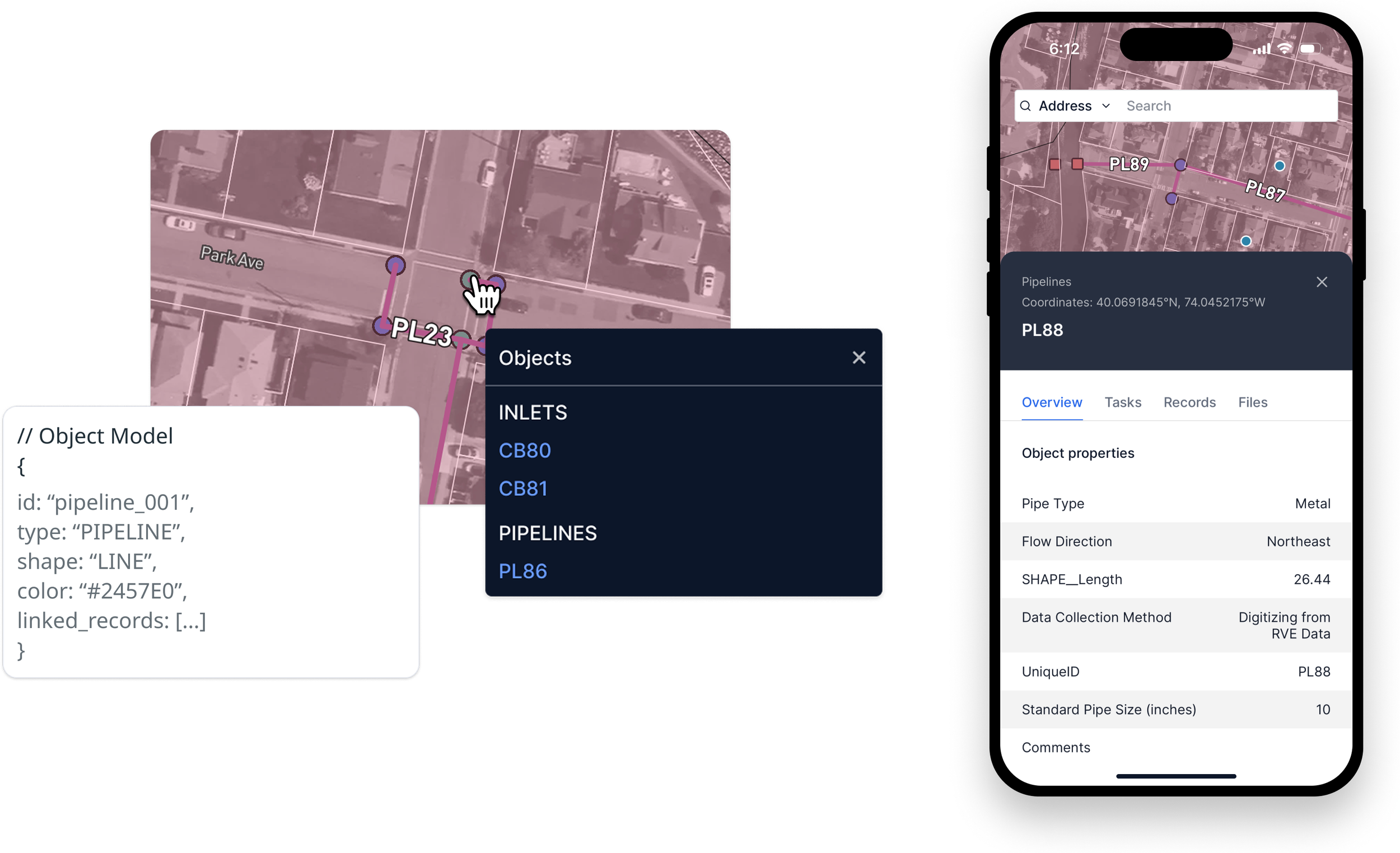
Disambiguation menu and Object Information Panel, available across web and mobile
Discovery & Strategy
This work needed to support real-world asset lifecycles (from inventory and inspection to maintenance and emergency response) not just map visualization. Before designing interactions, I needed to understand how stormwater assets already entered the system. GIS imported these layers through an external tool called Forest Admin, where they surfaced in Forerunner as static, view-only overlays that users toggled on in the Map Layers panel.
My first steps were to:
Map the current Forest Admin import workflow end-to-end with the GIS team
Audit the product for “property-only” assumptions (navigation, map layers panel, information panels, etc.)
Review customer calls to understand real-world asset workflows in inspections, maintenance, and emergency response

Existing Forest Admin import flow used to introduce interactive asset layers.
From here, I facilitated meetings with Product and Engineering to evaluate two paths:
Rebuild the entire import flow inside Forerunner (high lift)
Keep Forest Admin as the import tool, and add a lightweight configuration to mark a layer as interactive
We aligned on the simpler, lower-risk approach. Engineering added a single checkbox in Forest Admin to designate a layer as interactive.
That one setting became the bridge between static overlays and interactive, workflow-enabled assets — without disrupting an existing GIS workflow.
Design Highlights
1. Disambiguation menu for overlapping assets
Map assets such as Stormwater systems are dense: pipes intersect, inlets sit on top of drains, and a single click often touches multiple assets.
I explored three approaches to solve for this problem:
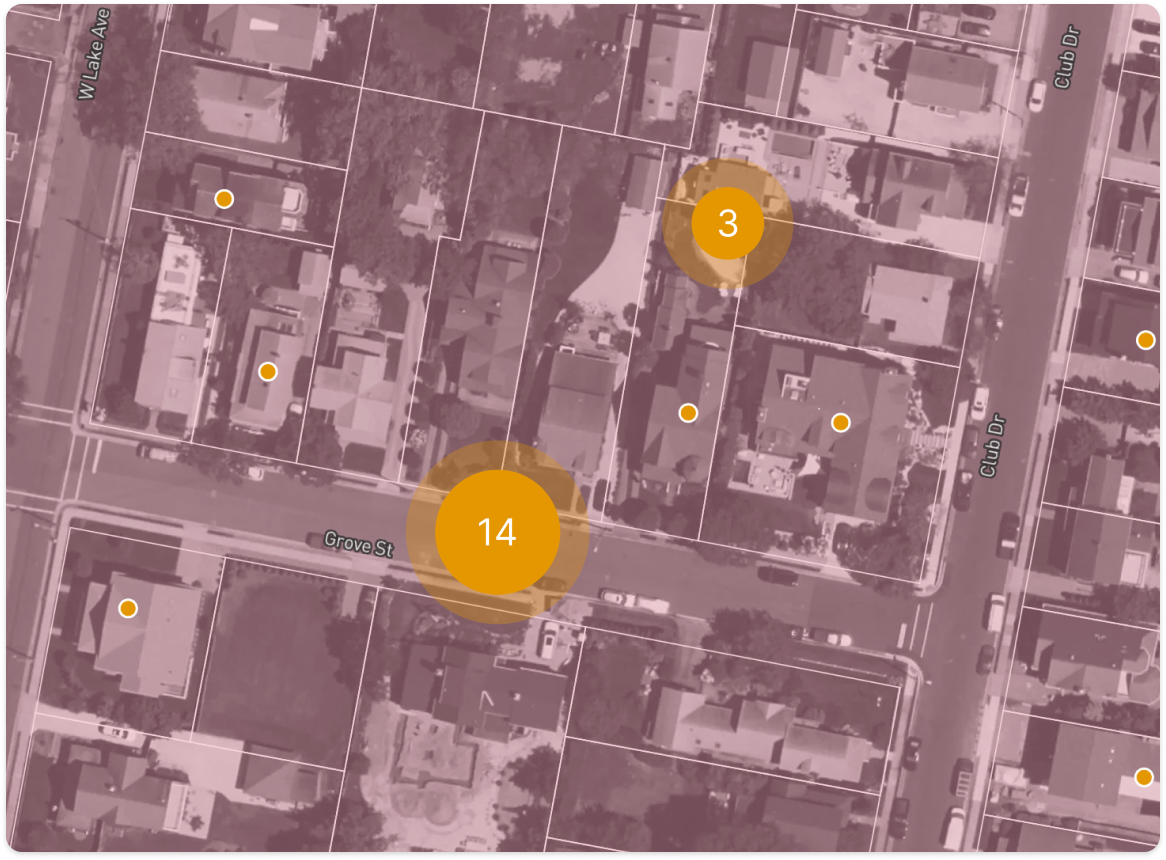
Map clustering via progressive drill-in on initial click
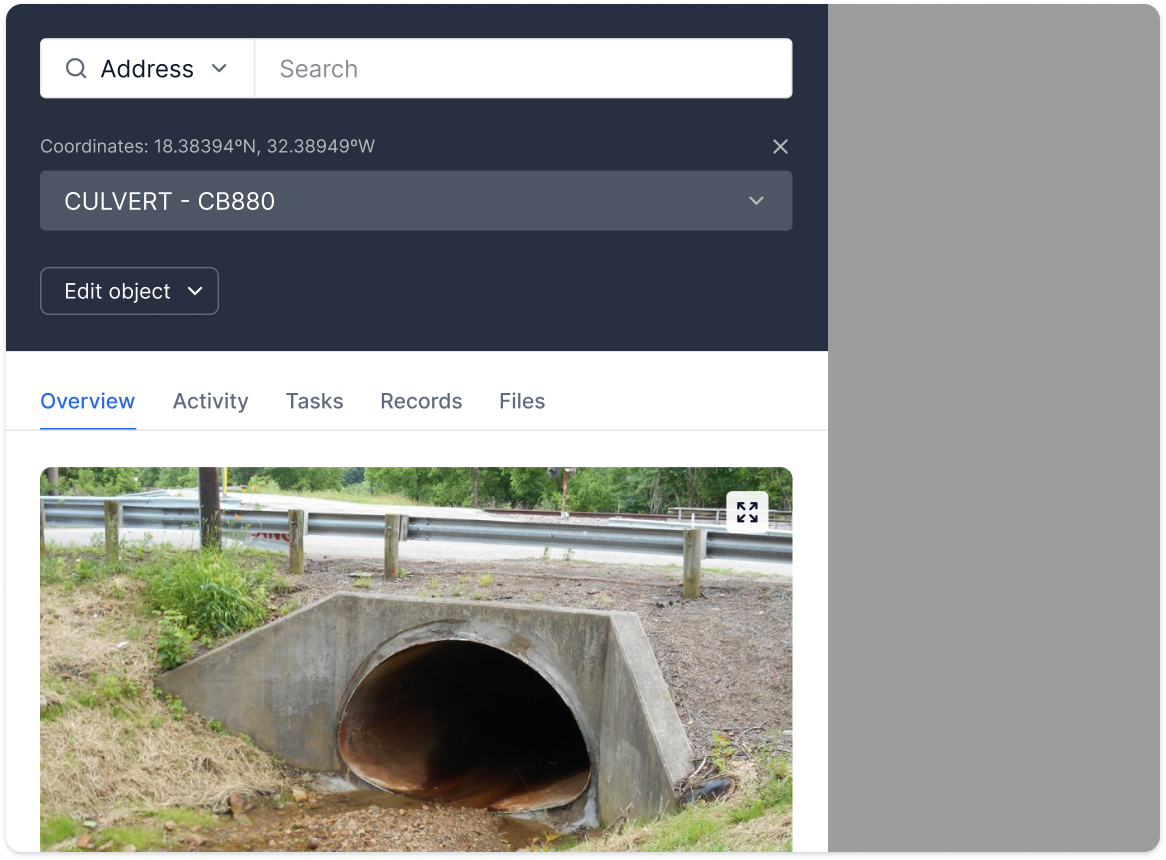
Object switching via dropdown in the Information Panel
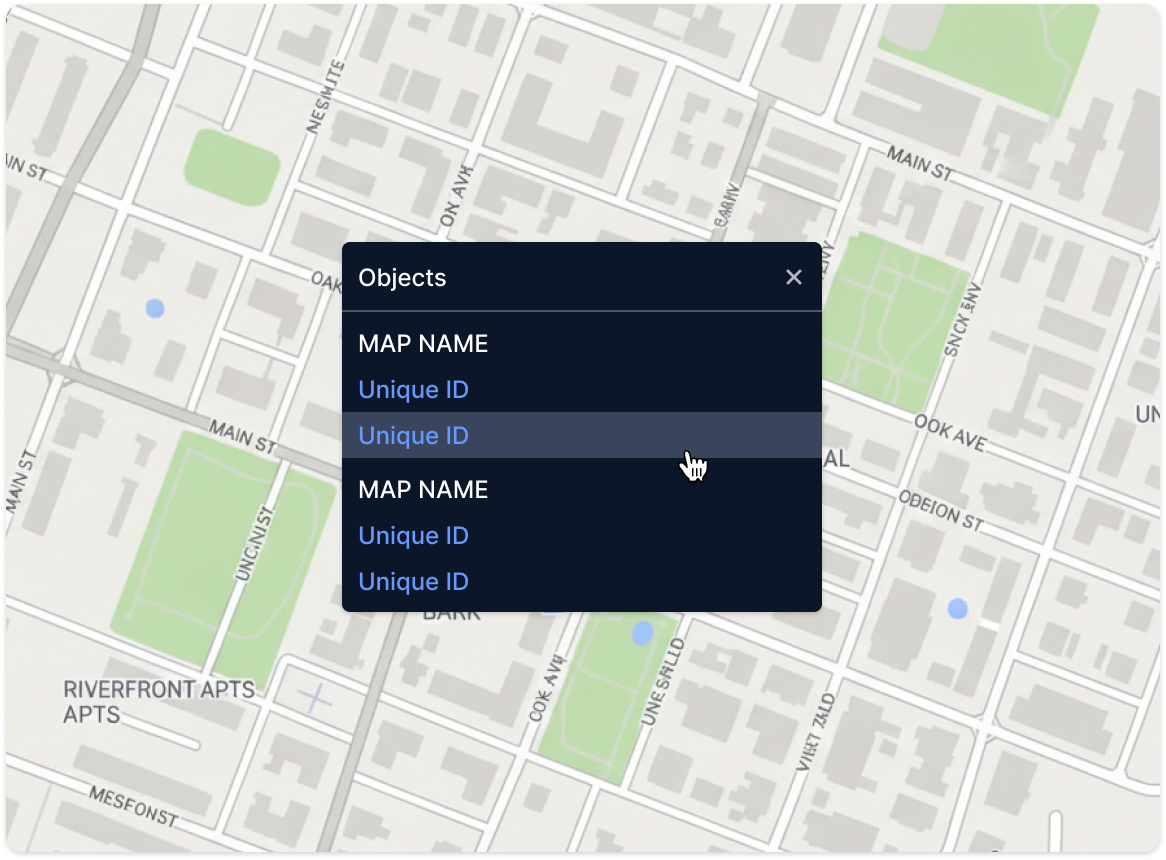
Contextual disambiguation menu at the click point
I chose the disambiguation menu for its clarity and minimal cognitive load since it:
Appears directly at the click location
Groups objects by type (i.e., Inlets, Manholes, Pipes)
Provides a quick path to the selected object’s panel
I partnered with Engineering to tune the click radius so the interaction felt precise but still reliably surfaced small or overlapping assets across web and mobile.
2. “Objects” section in the Map Layers panel
To reinforce the shift from properties to assets and infrastructure systems, I restructured the Map Layers panel:
Introduced a new Objects group (Properties + imported asset types)
Enabled toggling entire systems on/off
Framed every layer in this group as interactive, not decorative
This reinforced a new mental model: properties and assets are peers, both powering workflows, tasks, and records.
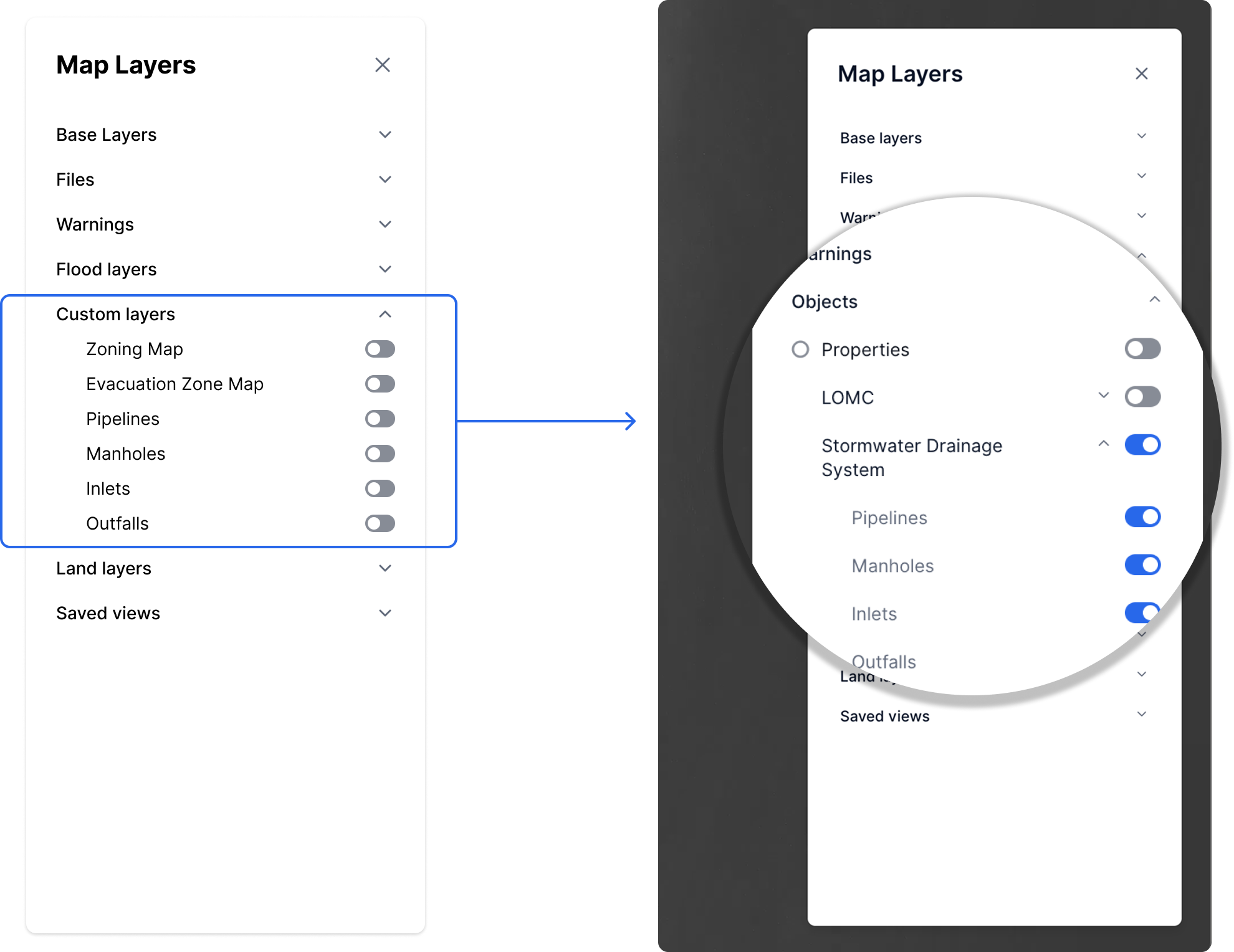
Updated Map Layers panel groups Properties and imported assets under a new “Objects” section, reinforcing that both are interactive and workflow-enabled, not just visual layers.
3. Mobile tray for asset disambiguation
On mobile, the click-radius problem becomes a tap-radius problem. I adapted the disambiguation pattern into a bottom sheet:
A tap surfaces all objects in the radius
Users scroll and select the correct asset
The pattern aligns with existing mobile trays, reducing learning curve and dev overhead
This ensured the interaction remained discoverable and thumb-friendly, even in dense systems.
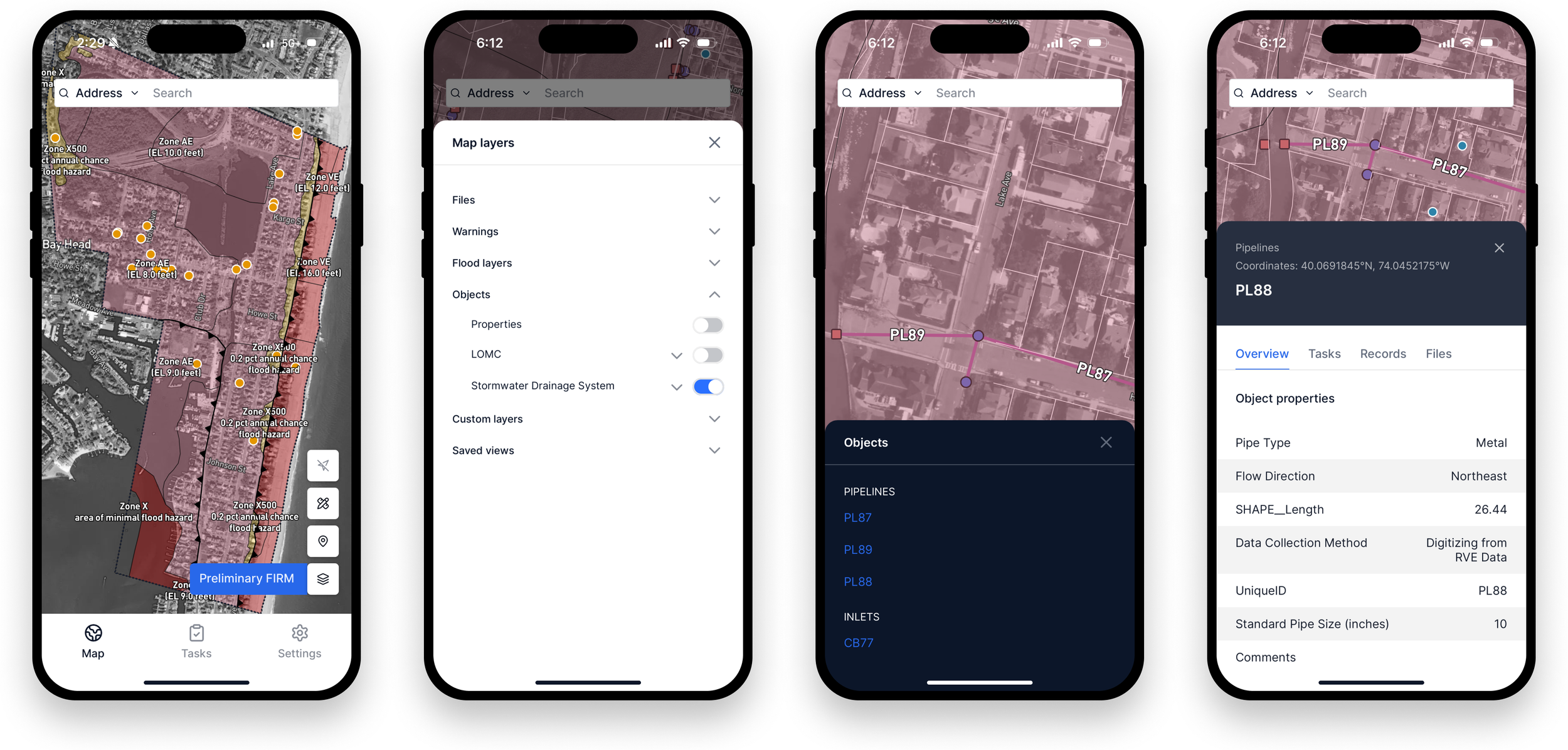
Mobile flow showing map interaction: tapping reveals nearby objects in a bottom sheet, letting users select an asset and open its information panel seamlessly.
Results
📍Platform evolution
The product shifted from a property-centric viewer to a more complete infrastructure and asset management platform.
💰 Business unblock
Enabled requirements needed to secure a statewide contract focused on stormwater asset management.
📈 Product foundation
Map Objects became the technical base for follow-on features, including object systems and system-level tables.
A live walkthrough of Map Objects in production, showing asset interactions, disambiguation behavior, and system toggle controls.
Reflection
This project demonstrates how I:
Extend a product’s core model without overhauling existing systems
Design map interactions that balance clarity, density, and performance
Translate the same interaction concept across web and mobile cohesively
In longer sessions, I walk through how these patterns later connected to records, tasks, and tables, creating a unified workflow across all object types.