Digital Case Filing
Mark43, 2023
Empowering law enforcement agencies in the UK to digitally file and manage court cases.
Role
Product Designer
Team
TPM, Dev (2), Global Services (2)
Timeline
4 months
Mark43 is a public safety platform that provides tools for police, fire, and emergency agencies. This includes modern records management, computer-aided dispatch, and analytics tools that help departments streamline workflows, share information securely, and improve operational efficiency.
Overview
The Challenge
In the UK, police agencies are legally required to submit complete, structured case files to local courts in order to prosecute cases.
Mark43’s RMS had no way to digitally package and transmit cases, forcing officers to rely on PDFs, emails, and manual handoffs. This led to:
Duplicate data entry across multiple forms
Cases sent prematurely without QA approval
Missed court follow-ups and requests
High risk of rejection, delays, or compliance failure
Digital case filing was a hard requirement for UK customer launches. Without it, Mark43 could not expand in the region.
Why this problem was complex
Case filing workflows vary based on arrest status, bail timelines, and supervisor availability
QA is not linear: cases may move forward, pause, or revert depending on court feedback
Multiple personas (officers, supervisors, QA admins, courts) interact with the same case at different stages
Engineering constraints limited where new data could be created vs. referenced
The Solution
I designed a case filing wizard that allows users to aggregate data from our platform into a Case, to then send this data, through an integration to local courts.
Deliverables included:
2 on-site research and discovery sessions, with recordings and synthesis
Case filing wireframes / mockups
Data model visualization handed off to the integration team
Customer sign-off on initial direction
Prototype of digital case filing wizard
Discovery and research
We kicked off discovery and research during an on-site customer visit in the UK, where I led a workshop with 8 participants to understand the current state of case filing and its pain points.
Key insights:
Officers need a single, authoritative “case object” instead of re-entering the same information across forms
QA needs a dedicated review space to prevent premature court submissions
Court communication is ongoing, not one-and-done — messaging must be tied to the case lifecycle
A rigid, linear flow would fail; the system must accommodate conditional paths
After synthesizing this research, I was able to build out an initial user flow. This was valuable in identifying knowledge gaps for future research sessions, and was used in a larger effort to create a journey map of UK-related projects across all of our system platforms. Personas involved in the process include:
Police Officers
Department Supervisors
Case administrators (QA)
Lawyers at local court
Case filing user flow across 4 users groups, in 2 integrated systems
There were two additional research and discovery sessions held where I prepared interview guides and walked customers through the user flow for validation. All sessions were recorded, with participant permission, and uploaded to Dovetail, where I tagged and analyzed findings, and shared these with the product team. This allowed us to refine scope, and craft appropriate user stories.
Dovetail analysis of research sessions, with tagged/highlighted findings; blurred to protect customer privacy
Ideation
Defining the Case Filing Data Model
There were two core problems to solve: the UX/UI for digital case filing and the underlying data model powering the court integration. A key risk was designing interface flows without a clear data structure beneath them.
I partnered closely with engineering and the Technical Product Manager to define the relationship between investigations, cases, and court messages, clarify which entities could be edited versus referenced due to system constraints, and establish a hierarchy that allowed integration work to begin in parallel with design. This unblocked development early and reduced downstream rework.
This foundation informed the core user capabilities:
Creating and editing cases from investigation data
Sending structured messages to courts from within a case
Managing cases at scale, while supporting QA workflows and both UK and US requirements.
Relationship between investigation, case, and messages sent to/from the courts
I brainstormed an initial set of design options via rough mockups and sketches, thinking through pros, cons, and level of effort for each, and presented these to product and engineering for feedback.
Design explorations, presented to product and engineering for feedback
Design Decision: Guided Case Filing Wizard
Through team feedback, I decided to proceed with a guided case filing wizard to manage this legally complex, multi-step workflow. This approach reduced cognitive load, made QA review explicit, and allowed us to surface pre-filled RMS data while limiting risky free-form edits.
Why a wizard worked
Breaks a legally dense process into clear, sequential steps
Creates a dedicated space for QA review and approval
Guides users using existing RMS data while preventing unsafe edits
Key constraints shaping the decision
Data tiers: the interface could reference entities but not create new data beyond the case level (investigation → case → message)
Case creation: users needed a focused “create case” experience to reduce cognitive load and support QA workflows
This structure balanced user clarity with system constraints and compliance needs.
DCF Data Model
I also partnered with a Technical Product Manager to break down the case filing integration’s data model – understanding interface implications of objects and fields, and thinking through the optimal information hierarchy for these. This was necessary in order to give this data some structure and to unblock engineering from getting started on the integration before final designs.
Preview of data model and initial thoughts on information hierarchy
Almost there…
I explored a few different layout options for the case creation/editing space and after another round of internal feedback, moved forward with the ‘guided wizard’ option that would surface existing data for users and guide them through each step:
Design layout explorations for selecting case content
Concept Validation
I worked quickly to create a prototype for validating the UX/UI and data structure by applying the established design system. I then prepared a research plan for moderated design validation with our customer in the UK (and eventually others in the US).
Prototype where users select/confirm the relevant entity date for the case, and then prepare a message to be sent to the local court.
Findings
Customer feedback on the case filing prototype was overall positive! A few preliminary findings worth sharing include:
Evidence and Attachments must be linked to the person entity they belong to
All victims and witnesses in a case must have an attached statement
Users were confused by ‘case summary’ as a navigation category
Messages, Action Plan, Hearing Information and History are not related to the case building process and may need a different visual treatment in the navigation
Celebrating small wins with the product and engineering teams!
Design validation with customers allowed us to move forward with the ‘wizard-style’ case creation process:
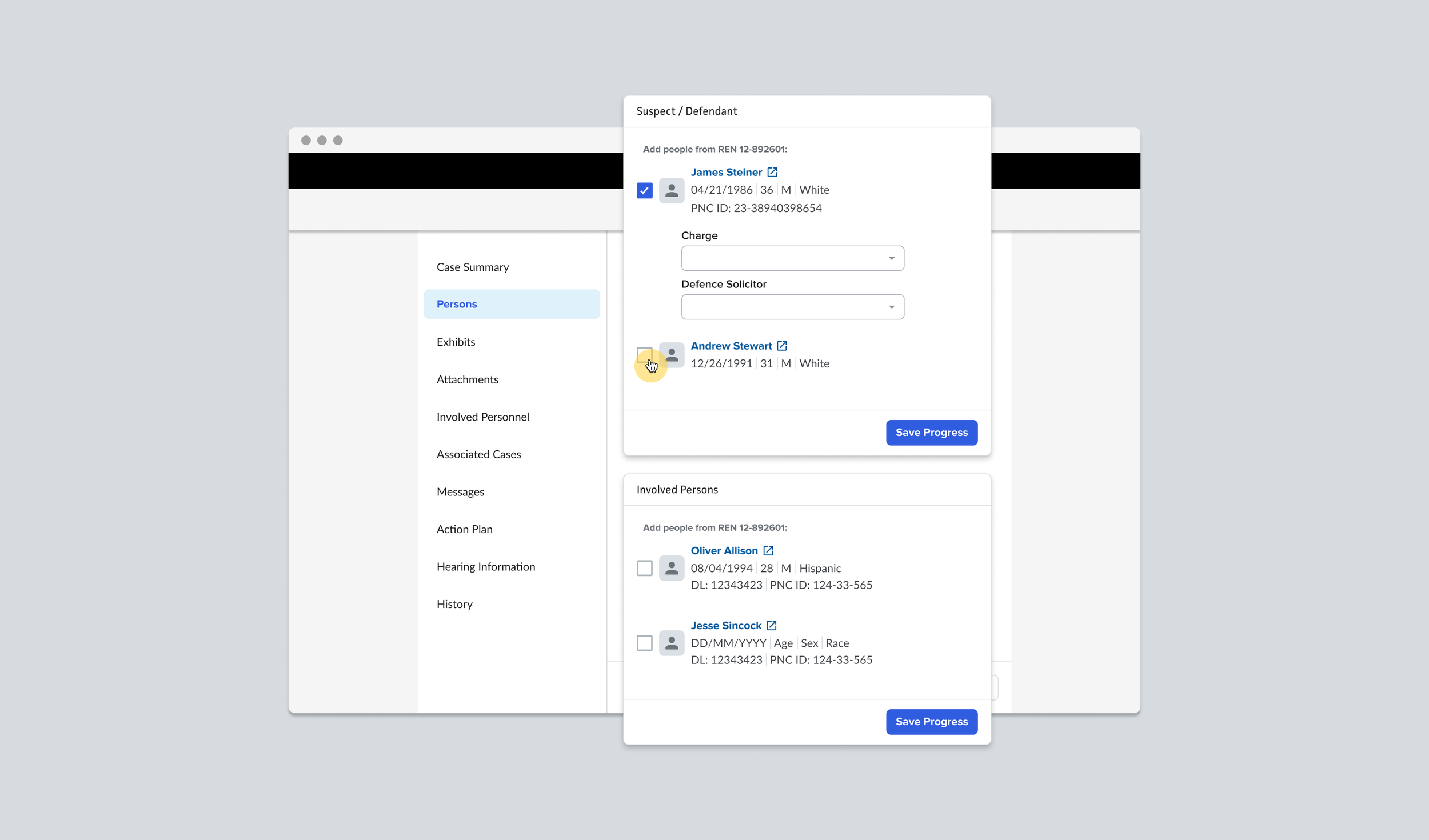
The case wizard guides users to select from pre-filled datathat are relevant to the suspect and charge
When ready to send a message to the courts, users select the message type and then add/edit information as needed.
What we changed based on validation
Reworked evidence handling to explicitly associate attachments with people entities
Required victim and witness statements before submission
Renamed and restructured navigation to remove confusion around “case summary”
Separated messaging and case-building concepts visually to reduce cognitive overload
Conclusion
Success Metrics - Impact
Met UK government requirements for digital case filing
Enabled launch readiness for two UK police agencies
Positioned Mark43 to unlock expected $ARR tied to delivery milestones
Established a scalable foundation for case filing across international markets
Project Challenges
Domestic + international workflows - different processes but one goal; the solution had to fit both needs. Further domestic testing is still needed but I leveraged internal case filing experts on US-process to validate initial direction (quick 1:1s to walk through user flow and design direction)
Core functionality vs configurations - I was unclear on the extent of configurations for cases so I partnered with our PM and customer experts in global services to identify core needs to case filing, separating these from what would be configurable for each agency
Tight timelines - product and engineering had to align on timelines to ensure delivery of this feature; this meant many syncs to plan and scope out the work, breaking it down into smaller deliverables for handoff. This was done during a recurring weekly sync, and other ad hoc meetings as needed
Lack of clarity in product requirements and user stories - this meant the need for multiple research and discovery sessions where I then analyzed findings and shared with the Technical PM for developing the feature spec
Next Steps
This project established the foundation for digital case filing at Mark43. Planned follow-ups included:
A case dashboard for managing workload at scale
Redaction workflows for sensitive data prior to court submission
Additional US-based validation and rollout
The work was handed off following a company-wide reduction in force.